You ask your coding agent for a new endpoint, and thirty seconds later you have code that looks fine at first. Then you notice it imports the date library your team deprecated two years ago and skips the schema validation your architecture requires on every input. It also writes a unit test, even though your pipeline requires integration coverage.
None of that is wrong in the abstract, but it's wrong for your system.
Making the prompt longer won't help unless you give the agent the information it was missing. You can add it to the prompt for that session, or put it in the repository so every engineer's agent can use it in future sessions too. Setting up a repository for AI coding agents is mostly that second kind of work: writing down what the agent could not have guessed, then adding the checks that catch it when it guesses anyway.
What a harness is
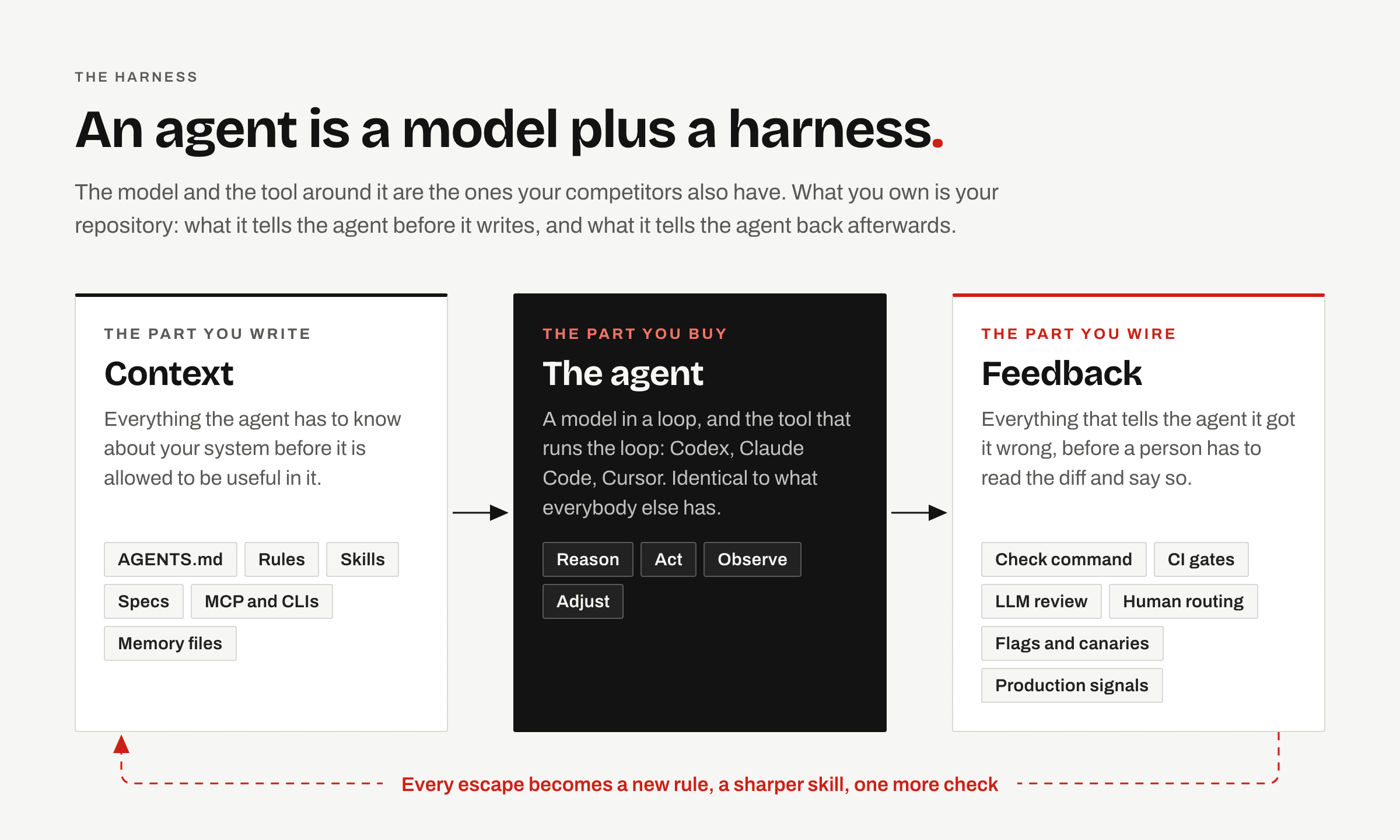
An agent is a model plus a harness. You get the model from a vendor, and your competitors have access to the same one.
The harness has two parts. The tool around the model, such as Codex, Claude Code or Cursor, controls how the agent reads files, runs commands and manages its context. Your role here is to choose and configure it. The part you build yourself is in your repository, and it explains why two teams using the same tool can get different results.
Your repository gives the agent context before it writes code: conventions, boundaries, workflows and the intent behind the task. Afterwards, checks, reviews and production signals tell the agent what went wrong so it can try again without waiting for a person to point out each error.
Keep both parts in Git alongside the code and review changes to them as you would any other code change. As you add what you've learned, the agent has more of your team's knowledge to work with. The same model that wrote generic code on day one can follow your team's conventions three months later.
Half one: the context an agent reads before it writes
AGENTS.md, the file that says where you are
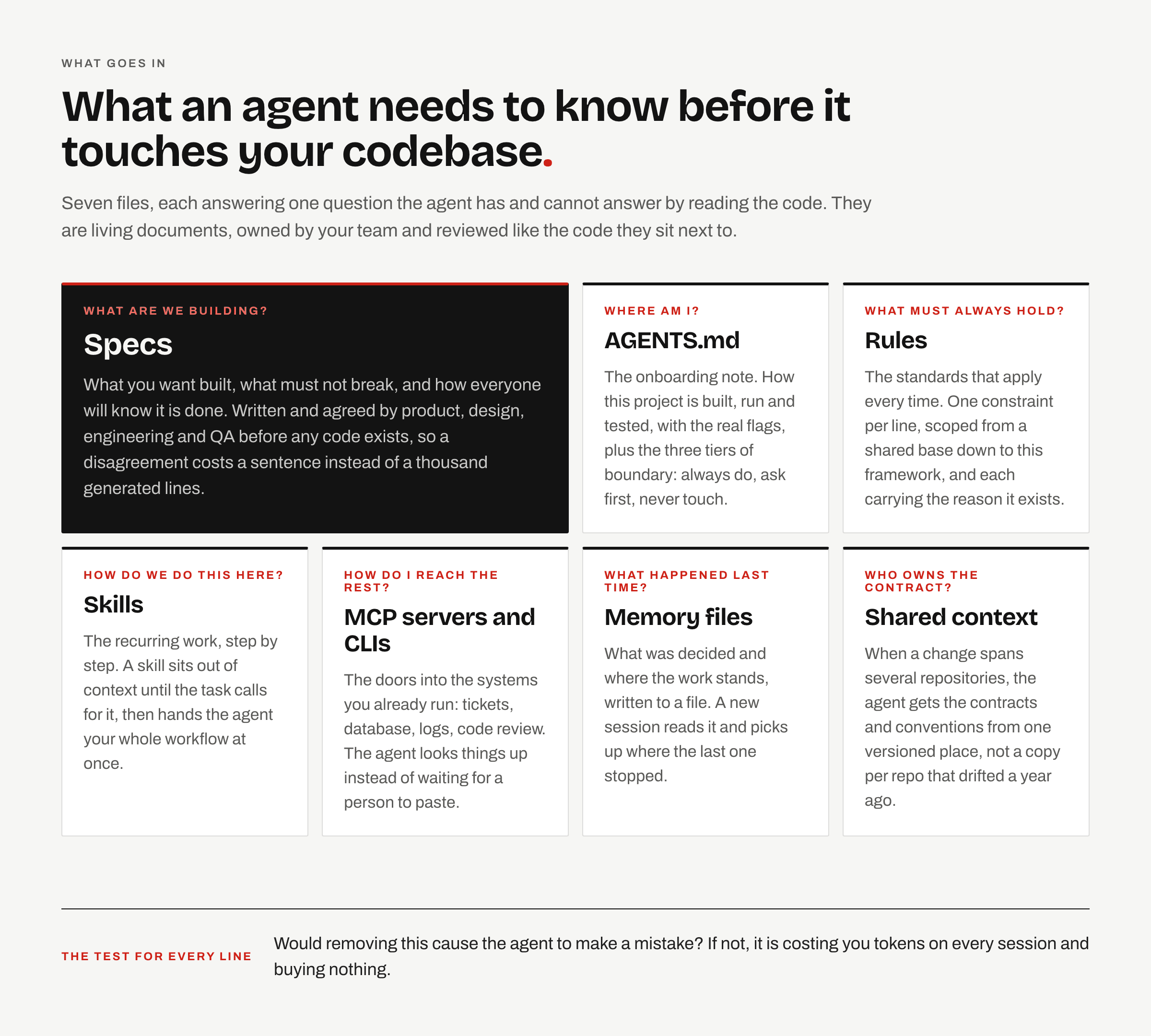
AGENTS.md is an open convention read by more than twenty agents, including Codex, Cursor and Copilot. A README usually helps a person decide whether to use the project, while AGENTS.md gives an agent the information it needs to change it.
GitHub looked at more than 2,500 repositories with an AGENTS.md and found that the strongest files cover six areas: commands to build, run and test; how testing works in the project; a short map of the structure; code style; the Git workflow; and boundaries. Put the commands first, with the flags you use. An instruction like pnpm test --run --reporter=dot gives the agent enough to act on without guessing what "run the tests" means in your project.
The whole file uses tokens in every session, so be selective about what you include.
Four tests for every line you put in it
- Could I catch the agent breaking it? "Keep the code maintainable" cannot be checked. "Use Decimal, never float, for money" can.
- Does every don't have a matching do? Forbidding the ORM in route handlers without naming the repository layer leaves the agent stuck.
- Did a real mistake put it there? If not, would removing it cause one? If not, delete it.
- Is the file still under 150 to 200 lines? Link out to the long documents instead of pasting them in.
For most teams, boundaries are among the most useful instructions to include. Group them into three tiers: always do, ask first, never touch. Use "ask first" for legitimate actions that are expensive to undo, such as generating a migration or editing a lockfile. Otherwise, an agent may do them as part of the task without mentioning it.
In a monorepo, you can put AGENTS.md files in nested directories. Agents combine the files from the root down to the file being edited, with the closest one taking priority when instructions conflict. OpenAI's own repository has 88.
Rules, one constraint and one reason each
A rule is a constraint the agent should follow whenever it applies, and the number of rules loaded matters. Harada and colleagues describe the curse of instructions: the chance that a model follows all the rules at once is roughly the per-rule rate raised to the number of rules. At 95% per rule, the chance of following all five rules is 77%. With ten rules it falls to 60%, and with twenty it is 36%. Keep the list short, because each addition makes it less likely that the agent will follow the full set.
Include the reason when you write a rule. "Use date-fns instead of moment.js because Moment is deprecated and adds 70 KB to the bundle" gives the agent more to work with than "use date-fns instead of moment.js" alone. It can use that reason to judge a case you didn't anticipate, and you can remove the rule when the reason no longer holds.
Use wording you can test. The EARS templates help with this: the system shall X, when Y the system shall X, while Z the system shall X, if W the system shall X. Organize the rules in layers, starting with a base that applies everywhere, followed by the language, the framework and the project. A Python service and a React app can share the base while keeping their own specific rules. If several repositories use that base, publish a versioned copy and pin each repo to a version so they don't have to maintain separate copies.
Harnesses such as Cursor also let you scope rules with glob patterns, which match file paths. For example, you can attach your frontend rules to **/*.tsx and configure them to load automatically when a matching file enters the agent's context. When the agent works on a .tsx file, it gets those instructions without you having to add them to the prompt. Those rules stay out of sessions that never involve matching files, leaving more room for context relevant to the task.
Skills, the workflows you keep retyping
Skills describe workflows, so they give you somewhere to put instructions that go beyond a single constraint. "Always validate inputs with Zod" belongs in a rule. A skill can cover the full process of adding an endpoint: copy the spec template, scaffold from the generator, validate the body at the service layer, handle the empty result explicitly instead of returning a zero, add an integration test against seeded data, and register it behind a flag that defaults to off.
By default, the agent loads only the name and description of each skill, at fifty to a hundred tokens per skill. It loads the full instructions when the task calls for them. This lets you write a detailed workflow without using up context in unrelated sessions, which you can't do with an always-loaded AGENTS.md.
When you find yourself typing the same instructions again, turn them into a skill. Review any skill you install from outside your team, including every script it points to. Keep skills in version control so someone reviews changes through a pull request, just as they would for code.
Specs, so "done" means something
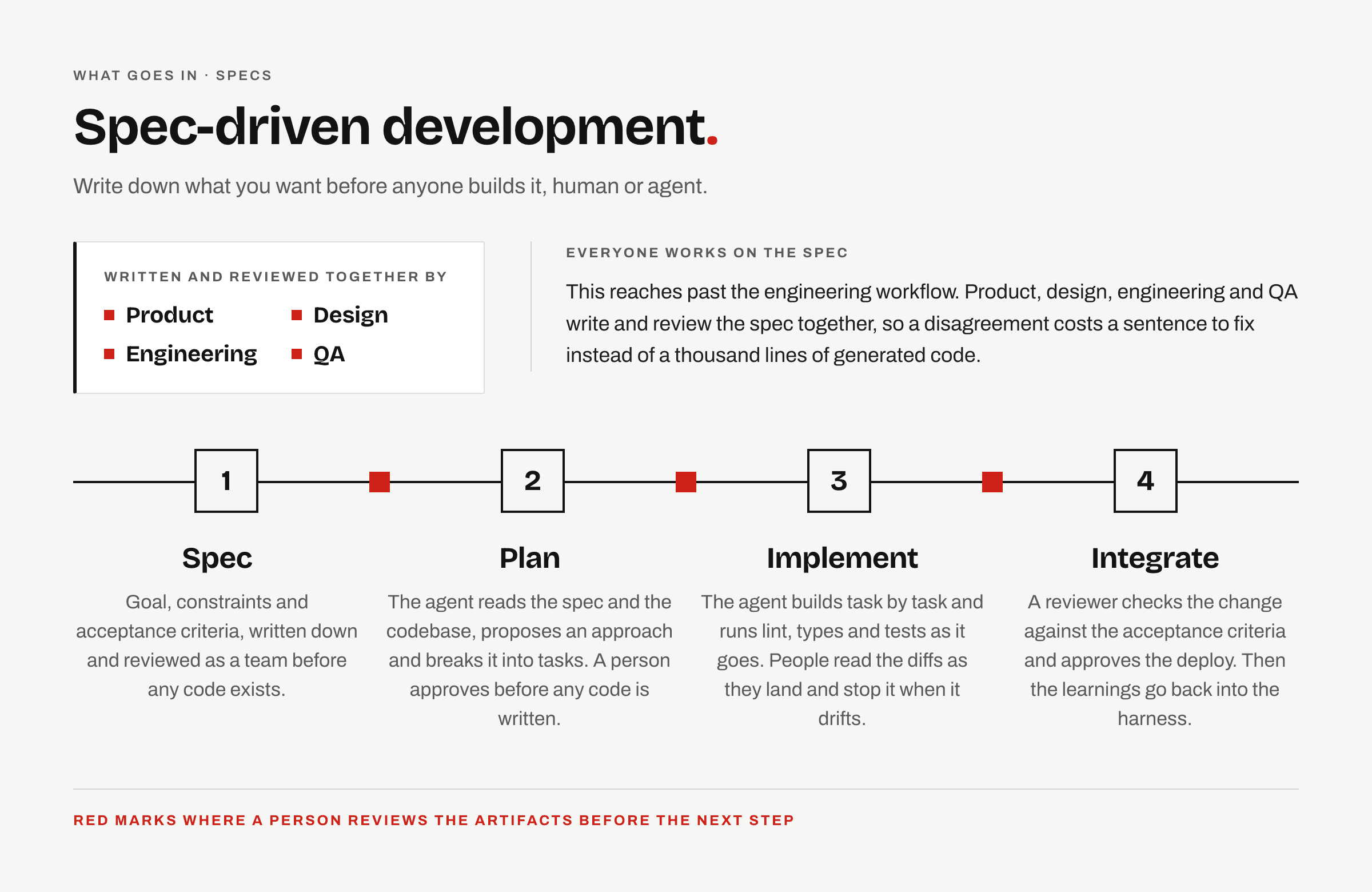
An agent can follow an ambiguous request all the way to a finished implementation of the wrong thing. It's much cheaper to resolve a disagreement in the spec, where you may only need to change a sentence, than in a pull request full of code built on that misunderstanding.
Keep the spec short and boring. Write down the goal, the constraints, the acceptance criteria and what is out of scope. The agent then uses the spec and the codebase to write a plan, broken into tasks with a completion check for each one. Have a person approve the plan before the agent starts writing code.
Later, the reviewer can check the implementation against those same acceptance criteria to see whether it built what was requested. Several frameworks package this workflow, with different approaches to the details. You can find a side-by-side comparison on this site.
Tools, so the agent stops waiting for you to paste
Without tool access, you have to fetch everything the agent needs. You run a database query and paste the row into the chat, then copy over the ticket it asks for next. Ten minutes in, you've spent most of your time moving information between tools.
Most teams use a mix of CLI skills and MCP servers to give agents direct access. If a good CLI is already installed, write a skill that explains how to use it. That could be gh, aws, kubectl, docker, or something in your own scripts/ folder. An MCP server makes sense when the service has no usable CLI, you need typed input and output, or several teams share the integration.
Choose based on how you'd do the task yourself. A terminal command usually calls for a skill; code that talks to an API usually calls for a server. Keep an approved list and assign an owner, because every server's schemas take up space in every session's context window.
Memory, so the next session is not the first one
As conversation history grows, the runtime compacts it. Details that seemed minor can disappear into a summary without any warning, so you can't rely on the conversation to store decisions. From using this daily, I treat roughly half the advertised context window as reliable working space. That's a rule of thumb, not a measured limit.
Put anything that needs to survive in a file. Before closing a long session, ask the agent to record the decisions and completed work, along with what it should do next. You can then start the next session by asking it to read that file and continue. This is called handoff pattern.
Half two: the feedback that tells the agent it is wrong
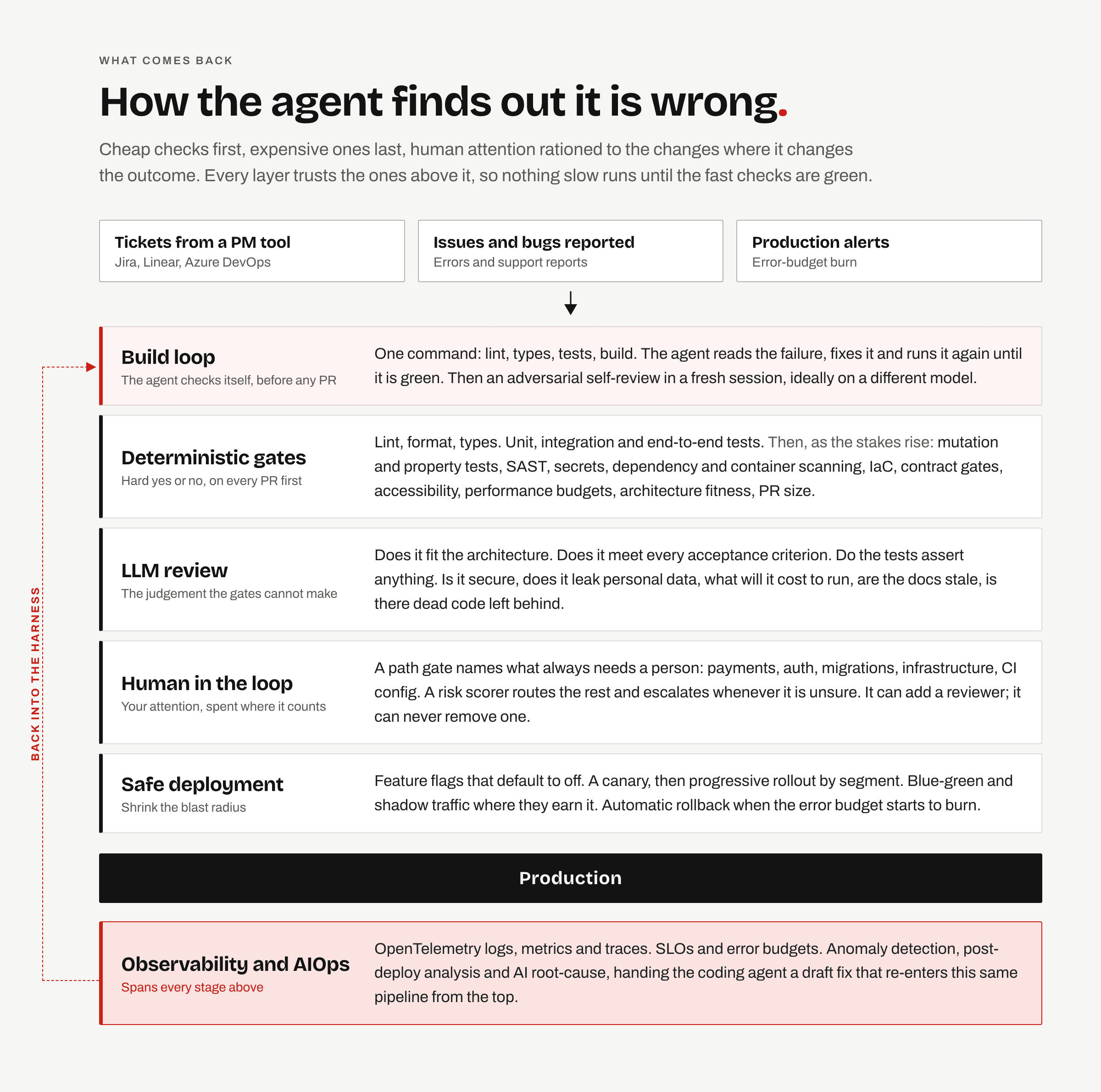
A well-briefed agent can open a working pull request in minutes, leaving human review as the bottleneck. Goldratt's Theory of Constraints applies here: speeding up work elsewhere won't help while diffs keep waiting for a person to read them. Reading faster won't solve the problem. You need to make sure that every change reaching a human has already passed the checks a machine can run.
One command to rule them all
Sorry, couldn't resist the quote :D Start by writing one command that runs lint, type check, tests and build in order. You might call it npm run ci or make check. Most of the tools are already installed, so putting the commands into one script takes about half an hour.
The agent can then run the command, read any failures and fix the code, repeating the process until it passes. Require a passing result before pushing a branch. Birgitta Böckeler's write-up on harness engineering describes checks like these as sensors. They're cheap enough to run alongside the agent on every change, giving it a chance to correct mistakes before a person sees the diff. With browser automation, the agent can also launch the app and click through the flow to find and fix failures.
The deterministic gates
Deterministic gates return a pass or fail without relying on anyone's judgement. They cost close to nothing per run, so run them on every pull request before a human or an LLM reviews it.
Choose the checks that suit your project. For a small internal tool, secrets scanning and a decent test suite will help far more than supply-chain provenance. For a public API, put contract gates and dependency scanning near the top of the list.
The floor, for everyone
Commit your formatter and linter configuration, and run both in check mode in CI. Use the strictest type checking your codebase can support and fail on every error. Run secrets scanning in both a pre-commit hook and CI, since hooks can be skipped, and require the test suite to pass.
Are the tests real?
An agent that writes both the code and the tests can reach 95% coverage without asserting anything useful. Mutation testing deliberately breaks the code and flags tests that pass anyway. Limit it to the files changed in the PR. Property-based tests check a stated rule against hundreds of inputs.
Security and supply chain
Use SAST to catch known insecure patterns, since models have learned from plenty of insecure public code. Scan the lockfile and container image for vulnerabilities, and fail on high and critical findings. Scan anything that provisions infrastructure too. Automate dependency updates so a known CVE doesn't sit unresolved for a quarter.
Drift, the slow kind
Architecture fitness functions fail the build when a change crosses a defined boundary. Check for dead code and unused dependencies left behind when an agent abandons an approach. Set performance budgets to catch slowdowns that are hard to notice in a single PR but add up over hundreds of changes. Contract gates catch changes such as renaming a field that a partner still parses in production.
Also flag pull requests that exceed a line threshold. An agent can return two thousand lines for a single feature, which is too much for anyone to review properly and makes the rest of the review process less useful.
LLM review, for the judgement a linter cannot make
A change can pass the type checker because all the APIs exist and still solve the wrong problem.
Catch this before opening the pull request by starting a fresh session with no memory of writing the code. Give it the diff and ask it to assume there are bugs and find them. Models tend to agree with what's already in front of them, which makes the agent that wrote the code a poor reviewer of its own work. Use a different model for the review where you can.
Give the reviewer enough context about your codebase to avoid textbook advice and the same five suggestions on every PR. Write a file with your conventions as concrete rules, two or three real incidents and their ticket numbers, the paths it must never comment on, and a fixed output format. Update the file whenever the reviewer gets something wrong.
Have it check the change against the architecture and each acceptance criterion, then assess risks to security, personal data and running cost. It should also check whether the documentation is up to date and whether anything remains from an earlier implementation attempt.
Human review, routed rather than universal
Requiring a person to review every PR leaves much of the benefit of these checks unused. How to decide which changes need a human is still an open question. The book starts with the following design, which combines path rules with an LLM risk scorer.
Keep a file of path patterns, similar to CODEOWNERS, that require human approval. A change to **/auth/**, **/migrations/**, services/payments/**, infra/** or .github/workflows/** must go to a person. This check is deterministic and immediate, and the list only needs updating a few times a year.
The LLM risk scorer reads each change that clears the gate and recommends either automerge or human review, with a plain explanation of what could go wrong. To use it safely, require it to escalate whenever it is unsure. It can add a reviewer, but it must never remove one or override the path gate. Log disagreements with the scorer, whether a human thinks it was too cautious or missed a risk, and use that record to keep it calibrated.
After merge, the deploy is a gate too
Some bugs only appear in production, where a race condition meets real concurrency or a query has to handle the full dataset. An integration may also behave differently against the live third-party service.
Ship behind a feature flag that defaults to off so you can deploy and release separately. The flag also gives you a way to disable the feature faster than a rollback. Enable it as a canary, monitor it against your error budget, and trigger rollback automatically when the budget starts burning.
Give the agent access to enough logs, metrics and traces to diagnose an incident and draft a fix. That fix goes through the same pipeline from the start. Add a regression test for every bug that gets through, and usually an instruction in the repository context too.
The order to build it in
Building all of this takes longer than a week. Trying to do it at once can leave you with an AIOps agent watching a service that still has no tests, so work through it in order.
- 01
One command, then make CI require it
Put lint, type check, tests and build in one script. Writing it takes about half an hour. Making it required on every branch and keeping it green takes most teams about a week, and the rest of the setup depends on it.
- 02
AGENTS.md, written by you
Include the commands with their real flags, a short map of the repository and the three boundary tiers. Then have the agent redo a task you did by hand this week, and remove instructions that made no difference to the result.
- 03
Rules, added one mistake at a time
Start with rules for mistakes you've already had to undo. After a session goes badly, ask the agent which single instruction would have prevented the problem, then decide whether to add it.
- 04
Specs, on one feature first
For your next real change, write down the goal, constraints and acceptance criteria before any code. See how much this shortens the review.
- 05
Skills and tool access
Turn your most repeated workflow into a skill and connect the two or three systems you keep copying information from.
- 06
LLM review, then routing
Start with one checklist reviewer configured for your codebase. Once you trust its reviews, start deciding which changes can go through without a person.
- 07
Safe deployment and observability
Add feature flags, a canary release and automatic rollback. Leave the AIOps layer until last, since it depends on the earlier checks and workflows being in place.
Most teams spend a long time on the first two steps, which is fine. Add another layer when you have a problem it would solve. The baby steps page organizes this work a little differently, as a checklist with a completion check for each step. It also covers running several agents at once and rolling the harness out to a team.
What will quietly break it
Having the files and tools in place doesn't tell you whether people are still using them as intended.
If a review bot comments on every PR, people can start resolving its comments without replying or changing anything. Watch how many suggestions they apply. Human review can become just as routine: a senior engineer who approves a payments change in twelve seconds hasn't had time to review it. Route fewer changes to people so they can give those reviews enough attention.
Copied rules also drift. If you copy the base layer into forty repositories, you have forty files that start out identical and then change separately. Pinning repositories to a shared version avoids that.
Assign someone to maintain the harness. The tooling changes in weeks, and people will work around a setup that nobody updates. Standardize the parts that affect shared work, including the agent, context files, gates and spec workflow, while leaving people free to choose their editor and prompting style.
Start with what hurts
If you're starting with an empty setup, the check command and a short AGENTS.md will help more than everything else in this article combined. If you already have some of this, use the problems you're seeing to choose what to work on next. The Readiness Analyzer checks the repository for gaps. The maturity assessment asks your team and often reveals work that everyone assumed somebody else had handled. For a rollout across the team, start with the AI-native team canvas.
There are separate essays on context engineering, spec-driven development, verification and quality gates and human in the loop if you want to go further into any of these topics. The book, AI-Native Software Engineering, covers each section in more depth with prompts, a worked example and team playbooks. It's out now in Early Release.